All these power hungry beasts coming out of Intel and NVIDIA feel quite out of sync with the zeitgeist in a world that's worried about the power bill - especially when the M1/M2 is there to provide contrast. I'm getting Pentium 4 vs Core architecture vibes.
> All these power hungry beasts coming out of Intel and NVIDIA feel quite out of sync with the zeitgeist in a world that's worried about the power bill -
These CPUs aren't consuming 250W all the time. Those are peak numbers.
Speed scales nonlinearly with power. These high TDP parts are halo parts meant for enthusiast builds where it doesn't matter that the machine draws a lot of power for an hour or two of gaming.
It's also trivially easy to turn down the maximum power limit in the BIOS if that's what someone wants. The power consumption isn't a fixed feature of the CPU. It's a performance/power tradeoff that can be adjusted at use time.
Just adding to what you said, a 24-core CPU won't get anywhere near peak power usage during gaming. Most games only use a handful of cores. The only way you'll approach it is with parallelizable productivity work like video encoding or compiling code.
My nephew, B, got his 16+8 i9, during Path of Exile, to peak at 250W, and use all 24 cores. He is running at 5.2Ghz, and using air cooled. We are not sure at all how it uses e-(efficiency) cores, when it has 16 p-cores w/ hyper threading, but it all did show up in the new dark mode task manager.
Any idea what for? I feel like PoE doesn't involve that much compute other than what would be offloading to the gpu. Maps are static, and I would have assumed that mobs are primarily computed server-side based on some sort of loosely synchronized state.
I guess I could imagine a few threads for managing different 'panes', a thread for chat, a thread for audio maybe? It's hard to think of 24 independent units of work.
I'm not a game dev, just used to play PoE and curious.
The trick used in AAA is to see each frame as an aggregation of core-independent jobs that can be queued up, and then to buffer several frames ahead. So you aren't working on just "frame A", but also finishing "frame B" and "frame C", and issuing the finished frames according to a desired pace, which allows you to effectively spend more time on single-threaded tasks.
The trade-off is that some number of frames of latency are now baked in by default, but if it means your game went from 30hz to 60hz with an frame of delay, it is about as responsive as it was before, but feels smoother.
I guess, but like... how? Like I said, I can't really think of 24 things to do lol. I'm reminded of Dolphin, the GC/Wii emulator - people would ask for more cores to be used and they'd basically be like "for what???", they started moving stuff like audio out, eventually they made some breakthroughs where they could split more things out.
Maybe with these frameworks threads are less dedicated and instead are more cooperative, idk. Really not my area!
Or simply put, there's too much going on. I remember they had to rewrite ASAP some parts of the engine right after the release of Blight due to FPS drops down to 1/inf at the end-endgame versions of the encounter, as well as server crashes.
Sort of funny story, the concept of this build (spell loop) is currently meta, sadly the servers have improved to the point that they don‘t crash anymore.
I've seen the NVIDIA driver eat up all the CPU on multiple cores without really doing anything substantial to the framerate.
This was back in the Windows XP days when I was working on OpenGL and DirectX. It would do this while rendering like a couple of triangles. One core I could understand, but not all. I'm pretty sure the driver had some spinlocks in there.
I also managed to find out the NVIDIA driver assumed user buffers passed to OpenGL (VBOs) would be 16-byte aligned, using aligned SIMD operations on them directly, even though there's no mention of alignment in the OpenGL spec.
It just so happened that Microsoft's C++ runtime would do 16-byte aligned allocations, while the language I was using only did 4-byte.
All is fair in love and performance wars I suppose...
I think you'll find that modern games use many more cores than they used to since mainstream consoles have all moved to being octa-core for the last two generations and you have things like Vulkan better allowing multi-threaded graphics code.
Many more cores yes, but 100% CPU usage should still be rare. If your game uses 100% of a 24C/32T processor, it will run poorly on a "mere" 8-core CPU, and most of your target audience won't be able to play it. You're right though, these aren't your grandma's single-threaded games anymore.
CPUs and GPUs keep getting hungrier and that is just not where we should be heading. I wish the perf increase didnt keep coming along consumption increase each gen.
Don´t let the TDP of T-models fool you. Power consumption to reach boost clocks can peak up to 100W for T-models of the previous generation, and the 13700T probably needs to run close to that to outperform a 5800X.
Its still pretty terrible from an optimal performance viewpoint. I can undervolt my 3070Ti by ~100mV, dropping performance by ~6% but dropping temperature by about 10C, or 13%, and dropping fan speed from PS3 to inaudible for anything <90% load.
If you consider the mainstream products of Intel and Nvidia, they have way more moderate power consumption. These products with massive power draw are ultra enthusiast products. They are an outlier. You could build a great PC now with a RTX 3060 and a mainstream CPU that would be fine with a 500~ watt PSU.
As technologists, we should support manufacturers pushing the limit in power and performance. It helps drive overall efficiency and move technology forward.
Power consumption doubled at least even on mainstream and keep increasing gen over gen.
1070 vs 3070 is +52٪ average (145 vs 220w) and +66% (154 vs 250w) sustained.
2070 vs 3070 is +10% (195) or +24% (203) sustained.
Even the 3060 you defend draws power as older flagships and 500w arent enough even for mainstream gaming.
And it keeps getting worse both on gpu and cpu size.
We aren't technologists but consumers, and reality is that x86 and gpus are in near duopolys so the 3 companies involved have little reasons to do a better job and it's clear Apple socs or more and more cloud moving into arm have not been enough of wake up calls.
In fact, the 3070 is significantly more power efficient than the 1070 is. Because while yes power is up 50%, performance is up 100%. So performance per watt has continued to improve even as power consumption has also increased.
The reality of power consumption is that it's the main lever to pull right now to deliver generational gains. It's the same lever Apple pulled for the M2 even.
> more and more cloud moving into arm have not been enough of wake up calls.
You mean the ARM enterprise SoCs that use just as much power as x86 does to deliver on average worse performance?
I believe AMD Ryzen 6000 mobile cpus can hold their own against the apple m1. They have comparable performance and can be set by the manufacturer at a TDP comparable to the m1(and still perform well). Except for mainly m1 optimized apps, GPU performance should be pretty comparable too. Ryzen integrated graphics perform better in gaming.
Power consumption is an issue, but worrying about CPUs of a gaming machine is like worrying about straws in the context of the pollution.
Electricity needs of an average household in western world are going to increase a lot in coming decades, with transition to more electric heating, cooking, cars, etc. Gaming machine power usage is minuscule compared to those.
The flaws in your calculations are apparent when we realize that modern CPUs clock down when they are not busy. You would assume this would be common knowledge on a site called Hacker News.
I would say that people who regularly invest in top end hardware don't care as much about power bills. Otherwise power efficient chips is the norm (laptops, phones, etc).
This is slowly changing IMO - I'm seeing concern over energy use even on forums discussing high end hardware builds as cost of energy mounts in Europe. Previously no one really ever mentioned this other than to laugh at poor thermals.
If some of Nvidia's next generation 4xxx series GPUs are close to 1000w draw as many rumors suggest, the total draw of a high spec Intel/Nvidia system is going to probably have similar running costs to an electric space heater when playing demanding games. The existing 3090ti is already a 500w part, which not so long ago was enough to power a whole system in addition to the GPU.
Yeah that's not true, at least here in the UK it isn't. My normal build will use 500W when gaming, so every couple hours that's £0.40. Every 10 hours is £4. That's just few days of gaming for me, not including all the other computer use, definitely adds up over a month, especially since my bills used to be £100/month now they are £300 a month.
Using your own numbers, if you're spending 200/month more on gaming then that's 500 hours/month or approximately every waking hour. Are you really gaming that much? And even if you are, that's a lot cheaper than practically any other hobby you could spend that much time on.
I never said I spend £200 on gaming? I just said that my bills have increased from 100 a month to 300, but that's due to rising energy costs in the UK, not my gaming habits . It's more that in addition to my bill literally tripling, costs of gaming aren't insignificant for me. It doesn't matter that it's still cheap for the type of entertainment - it adds up. Ever pound spend this way is not a pound spent on something else.
> It's more that in addition to my bill literally tripling, costs of gaming aren't insignificant for me. It doesn't matter that it's still cheap for the type of entertainment - it adds up. Ever pound spend this way is not a pound spent on something else.
Sounds like a route to being penny-wise and pound-foolish. If you cut cheap entertainment you may well end up spending more (because in practice it's very hard to just sit in a room doing nothing), and if your gaming costs are a lot smaller than your energy bills then the cost should be relatively insignificant, almost by definition.
Well the discussion started with saying "why would enthusiasts care about their energy consumption" - so my point isn't that I'm going to cut out entertainment altogether, but for my next GPU I will definitely look at the energy consumption and there is zero chance I'm buying a 500W monster, even if I can afford the energy for it. It's just stupid and wasteful. I might go with a xx60 series instead, just because the TDP will be more reasonable. Or alternatively I might play the same games on my Xbox Series S which provides me with the same entertainment yet uses 1/6th of the energy of my PC when gaming.
I don't use AC I think it's terrible to waste energy like that. I can understandan office or hospital, but home?
I'm from southern italy, it's hot, you sweat, you don't need to burn gas, coal or build infrastructure so people waste it to cool their room, this is so entitled and no wonder we're in full climate crisis.
People can't give up on anything really. It gets worse everyday and people's remedy is to make it even worse,. Nonsense.
So yes, it makes things much worse with a hot pc in the room.
In the USA, for a significant part of the year, chances are you have to add the electricity costs of running your airconditioning to get rid of that heat.
If you’re living in a colder state, you may have to subtract the costs of having lower heating costs.
the last 2-3 generations of cpus and gpus have seen the most innovation, efficiency, and performance gains in a long time.
If you don't want to drive a 5l truck, don't drive one, but 500W is not an average load, and if you have high electricity costs thats a you problem not an everyone else problem.
The largest parts of my electrical bill are distribution and overhead charges that don't change whether I use power or not. The marginal utility of the power vs the cost is quite reasonable.
This is nonsense. The last 2-3 generations of GPUs have seen nothing of the sort in terms of efficiency, the same is also true of many Intel desktop CPUs. The latest Alder Lake desktop parts from Intel have been universally criticized for power draw too.
Each of the last 4 generations of mid to high-end card from Nvidia has required more electricity than the last. By Nvidia's own admission, their future chips will get larger and hotter to some extent due to slow down in moore's law and future process nodes being harder to reach. The die size of the parts has also grown which does not help.
Its not a small trajectory either; 4 years ago the most power hungry consumer part from Nvidia was a 1080ti which would easily draw 250w under load. today that number is now 500w for the current 3090ti, and rumored to be 800-1000 for the 4xxx parts launching end of this year. A GPU often will sit at peak draw for hours at a time in games as they try to push as many FPS as possible.
A current gaming machine with recent components can easily exceed 500w constant load during gameplay, and this figure will rise again with the 4xxx parts.
The ONLY exception to this really is Apple devices, and even then its not clear we can compare an M1/M2 GPU to the fastest parts Nvidia offer.
My power is some of the cheapest in the country and we pay ~13 cents/kWh. It's a little misleading though since my bill breaks out generation and distribution costs into separate line items. They are both billed per kWH though and add up to 13 cents.
Yes. We have a fixed basic connection charge of $20. So it's really close to your $0.13/kWh when that is taken into account.
I wasn't trying to be misleading though because the point is the basic charge does not increase with usage. So for each additional kWh we add to that it's only $0.089/kWh.
It's worse than that. Gamer's Nexus had a video a few months ago about power transients becoming a bigger problem. Power spikes can
double the amount of power needed. It doesn't really impact average power useage, but it can cause a psu's ocp to shut down the machine. https://www.youtube.com/watch?v=wnRyyCsuHFQ
> If some of Nvidia's next generation 4xxx series GPUs are close to 1000w draw as many rumors suggest
Those rumors are for millisecond long transient spikes, not an average of anything. So basically the rumor is a 500w peak load. Just like how the current 350-400w GPUs have transient spikes to upwards of 800w. It's not a problem in terms of power consumption (although obviously the increase from 400w to 500w would be), rather it's an issue with over-current protection in power supplies tripping. It's a "need bigger capacitors" type problem.
Yeah exactly this. I have a 3080 with a 5900X, would consider myself an enthusiast, and after recent price hike to my tariff here in the UK electricity usage is definitely something that's on my mind. Like, it hasn't stopped me gaming yet, but I'm very acutely aware that I'm using £1 worth of electricity every few hours of play - it adds up.
I mean, thank you for the thoughtful advice about my finances, but it doesn't help in the slightest. Life is getting a LOT more expensive lately, with everything going up in price - I'm seeing my grocery bills double, energy bills triple, spending lots more money on petrol, on eating out, on taking my family out for trips, and yes - on gaming too. Is that £1 every few hours making me destitute? No, absolutely not and I'm extremely privileged to be able to afford it. But at the same time every £1 taken for this isn't a pound saved, or spent on my kid, or on literally anything other more productive.
So yes, I can "easily" afford it, but it doesn't mean that the energy consumption of my gaming rig hasn't affected how I think about it. Any future hardware upgrades will also be impacted by this - there is no way I'm buying a GPU with 500W TDP, even if again, I can afford the energy bills.
Whether he does or not it's none of your business, and it doesn't change the fact that those are high prices and sources of environmental issues.
This power draw is getting out of hand on desktop, consoles and x86 laptops and is largely a symptom of lack of competition and lack of technological advances.
The pilot light on my furnace went out years ago. I only noticed because when I opened the door to the room with my computer a light but noticeable heat blast hit me. It took a second, but I turned around and checked my furnace, etc instead of going in the room. It really was a revelation about how much heat those things produce.
I wonder what % of the overall power bill a PC actually consumes. My gut would say it doesn't compare, really, to the water heater or air conditioner, but it would be good to see numbers.
I would love some PSU metering ability, to see actual data about how much juice my PC is pulling down. Other than getting a kill a watt meter, how could one go about this?
I have what is probably a close spiritual cousin of one of those, and while it even touts a power factor display, it also loves to show ridiculously high values during idle consumption for anything involving some sort of power electronics (not just for my computer, but for example for my washing machine, too – it shows sensible values while the heating element runs, or when the motor actually turns, but in-between it shows nonsensically high values).
It is a few years old, though, so maybe by now quality standards have improved even for those kinds of cheapo-meters…
Calculate it. You'll have kW/hr costs for electricity which depend on where you are and can ballpark power based on fraction of the time it's running and the components in it.
My standard dev machine is ~1kW flat out, ~500W most of the time, probably 100W idle. Runs for about eight hours a day. Say 500W is the average, suggests 4kW/hr a day. That's about $2 a day in the UK.
(those power numbers are relatively high - it's an elderly threadripper with two GPUs)
I think that 500W average is the tricky bit. When web browsing for example, my laptop (linux+intel) seems to spend 99% of the time in the C1 halt state, according to i7z.
I can say that when my son left for college last fall, our electric bill dropped about $30 a month compared to the months he was here (after adjusting for seasonal heating/cooling costs). He has an i9-12xxx gaming rig with two monitors. A Prusa 3D printer that gets a lot of use and a few other gadgets and such.
In Intel's case, they need to push these insane TDPs in order to even dream of performance parity with AMD and Apple. All those years spinning their wheels on 14nm+++++++++++ are biting them in the ass.
Between this and the ridiculous TDP expectations for this generations latest graphic cards people are going to have to start thinking about using dedicated circuits per gaming computer.
It certainly makes building Mini ITX a lot more interesting when you're trying to get the sweet spot for performance to thermals/noise ratio.
I did a nCase M1 build recently and my objective for the build was small as possible, quiet as possible, and as powerful as possible in that order. I still ended up with a pretty powerful machine by going with an i3-12100 instead of an i5/i7 which uses much less power and puts out less heat. The RTX 3080 reference card was the biggest card that could fit into the case which I undervolted.
A lot of people are undervolting their RTX GPU's because for an only about a ~3% performance loss you get about 10C less temp which translates to far less fan noise. I don't know why Nvidia doesn't just have a one click button for people.
nCase unfortunately have discontinued this case based on 'market factors' which I suspect means that they don't anticipate things to be getting smaller and cooler any time soon.
>A lot of people are undervolting their RTX GPU's because for an only about a ~3% performance loss you get about 10C less temp which translates to far less fan noise
Bah, this is brilliant. I just upgraded a 1070 to a 3070 and am flabbergasted at how much heat it dumps into my room. One of the reasons I did not go with the 3080 was the ~100 watt lower draw.
Do you know of any good tooling to assess the impact of undervolting or is it a manual guess-and-check process?
Trial and error. You need to dial in the right point on the voltage/clock frequency curve for your workloads, AKA "just play some games and look at the results." Just use whatever your overclocking software for your motherboard is, and modify the default curve it has. I use MSI Afterburner and just set a flat clock frequency (plateau) at a certain voltage level to undervolt. I think for NVidia GPUs there's a way to modify the curve with the default tooling, but third party tools like Afterburner can also do it.
You can get great results pretty fast this way. My Mini-ITX build is about as thermally compact as possible given the parts (3080+Ryzen 5600X, NZXT H1), and I'm pushing my PSU to the absolute limits in the stock settings, so undervolting is important for safe power margins since the 3080 can reach ~360W in my testing. I think 30 minutes of tweaking got me something like a +80W power drop for only 10% FPS in Read Dead Redemption 2 @ 4k60fps; I never breach 300W now which is within my personal safety margins, and can native 4k everything.
Some software like Afterburner have "Overclock Scanner" tools that will run benchmarks and repeatedly try to dial these settings in for you, but it really is easier to just modify the curve manually and test your specific workloads.
I just built a Ryzen 5600G system (without a discrete video card atm) and you can set either temperature or power consumption limits in the BIOS and it will underclock itself (actually turbo boost less) until it obeys your limits.
Perhaps I'll wait with the video card until they give me the option to do the same there...
This is the correct answer to tackle power draw. Use Vsync/Adaptive Sync for fixed refresh monitors, or FreeSync/GSync for variable refresh monitors.
For variable refresh rate monitors, it's best to use framerate limiters as well: either in-game or in the Nvidia control panel. Set the cap at least a few fps lower than your monitor's max refresh rate. Even better, aim for 90-100 fps cap, beyond which diminishing returns kick in and power bills continue to creep up.
i use prime95 for cpus and msi kombustor for gpus. if they can run for a while without errors i keep my settings, otherwise i increase power/voltage and try again
prime95 isn't a very good test anymore. With the changeover from blend to smallfft, it doesn't test the frontend or the memory controller or any of the other parts of the CPU very well anymore, it loads the kernel into instruction cache once and then it just slams the AVX units as hard as it can.
so not only does this not test the rest of the cpu at all - meaning you can run into problems with other parts of the CPU that aren't stable at those frequencies, because they're not being tested because it's only running the AVX units - but it also doesn't test frequency/power state changes at all, so you can run into situations where as soon as you close prime95 and it drops to a lower p-state, it'll crash.
gpus have run into similar things with furmark and kombuster and other power-virus tests... actually the GPUs themselves will detect when they're running and throttle down, so they no longer even do the thing they're supposed to, but, gpus also change power/frequency states under real-world workloads, just like CPUs, and they don't under furmark/kombuster. this actually caused a crisis at the ampere launch... all the testing had been done with a "pre-release bios" that only allowed these sorts of power/thermal testing, and it turned out that while the chips might be stable at max p-state, they weren't stable when they shifted back to a lower p-state, or from a lower p-state back to maximum. That was the whole "POSCAP vs MLCC" thing.
prime95 and furmark were very very popular 10 years ago but that's where they belong, they don't do the job anymore these days.
Uses the CPU fan as a case fan. By protruding through the top we get a lower profile than is possible with any other ITX case (well the standoffs can be cut down but that has not be optimized).
My next build will be an upgrade of the same design but with a Zen 4 or 5 chip with 8 or 16 cores depending what fits in the power constraints of the Pico-PSU. It will be a while though because that system is still more than enough for everything I do with it.
Mini ITX is also insanely more expensive than building a regula tower. Sure, if you're only putting the most expensive CPU and GPU in it then probably it doesn't matter to you but for value oriented builds, miniITX case, Mobo, PSU and cooler add up a lot.
You can get a great cheap ITX cases these days for about $50 (Cougar), A 650w SFX Power Supply for about $70 (Evga), ITX motherboards start at $110... then just make sure you choose a sensible CPU/GPU from there based on your power supply. And if you're using entry level cpu/gpu then you don't need to go crazy with cooling either.
Certainly not much more expensive than a regular mATX build imho.
I have an M1 gaming build where I prioritized efficiency; 5800X3D and RX 6600 with a 450W PSU.
I also have a mini-ITX Lone L5 build with an i3-12100 and no GPU with a 192W PSU. (Effectively - PSU is technically a bit more, but the AC/DC adapter is only 192W.)
> A lot of people are undervolting their RTX GPU's because for an only about a ~3% performance loss you get about 10C less temp which translates to far less fan noise. I don't know why Nvidia doesn't just have a one click button for people.
Yeah, I did exactly that with my 3080. Dropped ~50W depending on the game and I was able to keep the same clock speeds.
Undervolting actually let me over clock my 3070 higher, presumably due to extra thermal headroom? I noticed two peaks in the timespy results and undrrvolting moved me between them, so this must be pretty well known.
For people who use resistive electric heating I've recommended them to run crypto miners on their computer. Same efficiency with regards to heating, but you can earn some extra money as a bonus.
I lived in a little apartment with resistive wall heaters and I did just that in the 2018 period. Even had some Raspberry Pis mining Aeon, a lightweight offshoot of Monero.
Not really even close. Even with a 235W CPU and a theoretical 600W GPU you wouldn’t actually exceed even half the capacity of a single 15A circuit in synthetic benchmarks that stress the system beyond real-world loads.
I think the issue is with older houses that might have 15 amp circuit breakers compared to the modern standard of 20A. One high end desktop computer by itself isn't likely to be a problem, but the way these houses are wired, there are a lot of outlets on the same breaker since they were mostly designed for lighting loads. Our 1950 house in MI will flip the breaker if we use the microwave, toser and bathroom vent at the same time, and my desktop is also on that circuit (with a UPS)
15A vs 20A is a factor of the gauge of the wires as well. You can’t just swap the breaker for a bigger one. You’ll get heat and depending where that could burn the house down.
I have a relative whose house burnt down due to stapled wiring in the attic. Thermal cycling eventually created a short. When your attic catches on fire the smoke alarms go off in time to save the people, but the moment the ceiling starts to cave in the entire house is involved and you’re mostly trying to keep the neighboring houses from burning.
You have a 15A Fuse. You use a 12A Microwave, a 10A Toaster you have blow your breaker right there, and a 10A Bathroom vent?
if you run a separate circut for the Microwave, and separate your bathroom vent + your bathroom LED lights, you can run all of them at the same time with your toster. Running circuts is comparatively easy, vs installing a new 200A fuse box.
If you have bathroom and kitchen on single circuit you have bigger fucking problems than powering gaming PC, whoever did that abomination needs to be fired.
For sustained loads you are only supposed to draw 12A, and the PSU has a conversion loss, dropping you to perhaps 10A of power for it all. Plus, then you can’t run anything else on the circuit.
Why wouldn't they be on the same circuit? The monitor and computer are in the same room and would generally be plugged into the same outlet. I think this would be the rule rather than the exception.
That’s absurd. Most people will not only plug them on the same circuit, they’ll plug everything into a single multi plug feeding from a single wall socket.
I’ve never seen anyone, in corporate and home environments , split their circuit use like you describe.
I would argue most people wouldn't even understand concepts like a circuit.
All they would see is an electrical cable and plug in hand, and an electrical outlet on the wall. Put two and two together, computer turns on. Circuits? Watts? Load? Might as well be pig latin.
Sure, you would be able to put smaller power draw items on the same circuit, but between the CPU/GPU/Motherboard/PSU/Monitors/Peripherals you will not be able to put two of these machines onto the same circuit.
Maximum available power for standard domestic users is still only 3kW in many places. Might not be enough for a gaming PC, washing machine and microwave!
Exactly, a "cooking fuse" is not uncommon, which is two 16A lines to the same stove. That gives you 7360W to play with, something you won't reach in practice.
Alternatively, if you already have a multi-phase connection, then you would of course have the lines on different phases. If you have a 3-phase connection 25A main fuse is common, for single phase connections 35A is common.
Just to clarify here: when you talk about a "main fuse", you mean one that sits between the meter and the entire rest of the panel, correct? So individual circuits would be downstream of the main switch.
For context, most American homes have 240V split phase (single phase for all intents and purposes) service with a 200A main breaker.
Wtf do residential homes need 48 kW of power for? I guess it's nice to charge your car quickly, but other than that I'm struggling to think of any uses.
Simultaneously washing and drying clothes while cooking a turkey in the oven, brussel sprouts in the toaster-oven, boiling water for tea, distracting the children with a computer or tv, doing some welding in the garage, and powering a bunch of Christmas lights. --- This is something that actually happened one year. It is much easier to use a big wire and a big breaker/fuse to the house than to have the power go out.
Between my electric heat, dryer, stove, water heater, and car it's easy to get close to the limit, and that's before anything that runs on 120, like computers, a refrigerator, lights, or washer.
If you have a circuit in your house that trips for “no reason” this is partially why.
With a steady load you can run a circuit breaker past the rated amperage on the breaker. But look at it funny and it will pop.
The most obvious case of this was when I knew someone who would plug a vacuum into a different circuit and blow a breaker. Just a little noise on the wires and click.
People often use power strips for their computer. So you also have your dual 4K LCD monitor system, as well as maybe plugging in a phone to charge as well which can have high peak power draws over USB 3.0.
I actually did this...I got two dedicated circuits put into my room - one for the window unit AC (no point in cooling the whole house when I really just need to cool this room most of the time), and one for my gaming computer. My work laptop, lights, etc. are all on the original main circuit of the house.
A friend of mine is an electrician so the price was very reasonable, and it has been worth it, especially during this hot summer.
I did something similar for my home lab setup in my previous house. It was pretty reasonable having two dedicated 20A circuits run w/ surge protected hospital-grade outlets and dual function breakers. Each circuit fed a different UPS which fed a different PDU so everything had redundant power back to the breaker panel, which was all I could reasonably do residentially, and it meant none of the servers/network gear impacted the rest of my office circuits.
It was reasonably cheap, and in my next house I'll do the same again. Running additional circuits is pretty easy if you have an attic or crawl space.
Into the room I'm cooling. I suppose it would be possible in theory to do so, but the particular layout of the room makes it difficult to impossible to exhaust both the AC and computer, I think.
Ironically, I have a printer that really needs a dedicated circuit. When it warms up the toner, it draws 12 amps for 1-2 seconds.
Printing often pops the breaker. I had to move the printer out of my home office into a bedroom, but even then we've popped the breaker when printing while vacuuming.
There are types of fuses that have a time delay on them for this purpose. A lot of electrical appliances have that kind of startup burst of energy. An electrician can tell you more
Peak draw for even a current-gen graphics card is well over 500W. There are rumors that a 4090 will need as much as a 1500W power supply to run it. That's almost a complete 15A circuit just for the PC once you factor in cooling, speakers, monitor etc.
I already have issues where the breaker would pop with my current gaming PC if it fully spins up and I had to get a 20A circuit put in to handle it (mostly because there is more than one computer on the circuit).
Just realized everyone's gonna have to turn their power targets down when running a LAN party. I gave my brother my old 2080ti, something would coil whine when he played Battlefield. We turned the card's power target down until the whine went away. We found at 35%, the whine stopped, and the performance difference was not easily discernable with a basic FPS counter just flying around a MP game.
Opportunity for software that dynamically adjusts CPU and GPU power targets in the middle of various games, learns the game's power/performance profile and whether it's CPU/GPU bottlenecked, and optimizes perf/watt while maintaining a given FPS target?
For those of you unaware, most households in the USA have 15amp circuits for their wall plugs. With that you can safely pull about 1200Watts constantly.
I am unsure what the normal household circuit amperage is in the EU or elsewhere...
This is the definition of “working smart vs. working hard”. Not everything about the CPU needs to be solved by pushing it to the limits of physics. TDP is not linear relative to CPU freq.
We usually only use that high amperage fuses on high power appliances, like ovens or workshop equipment from my part of Europe.
I would say it's more normal to be fused to 10A for most indoor things, anything else is not normal, as most home appliance power cables are not even thick enough to carry the 16A 230V power safely.
That's not a TDP, which is a sustained metric (originally designed for board/cooling design integration) and shows 125W for that part. The 250W number is a new thing they're calling "Processor Boost Power" and I guess it's intended to represent some kind of "maximum short term draw" number. That's not something that's been historically reported for other parts, so it's kinda wrong to try to compare them 1:1.
intel's following AMD and introducing a "PPT" terminology for the boost value, since they routinely get compared against AMD's (non-boost) TDP values.
even in this thread you see people saying "wow intel pulls 250W against AMD's 105W processors"... when the comparable PPT number for AMD this generation is actually 230W, and their previous-gen number was 145W.
It's a huge marketing disadvantage, just like with node naming for fabs. Intel's 14nm is hugely better than GF 14/12nm or TSMC 16/12nm, and 10ESF is comparable to TSMC 7nm (although much later ofc). When the competitors are playing marketing games, to some extent you just have to start playing them too.
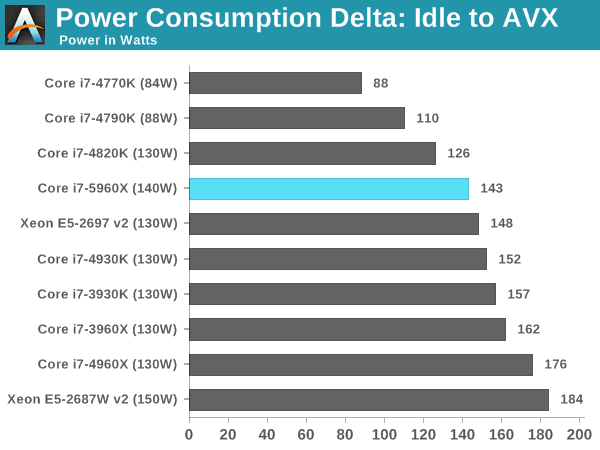
Desktop/HEDT TDPs used to pretty much cover boost clocks, the "tau" concept always officially existed but (eg) 5960X has a 143W idle-to-prime95 power delta as measured by Anandtech, so, the 140W tdp is pretty much sufficient to cover any "normal" non-prime95 AVX load at full boost clock. Similarly 4770K is a 85W TDP on paper and the measured idle-to-prime95 is 88W. Overclocked desktop loads could go higher of course, but most people overrode tau limits anyway in those cases. So in practice, tau limit was pretty much only a thing that existed on laptops in the intel world, because there was always enough TDP available to cover boost clocks, in a stock configuration.
Then AMD came along with Ryzen and started marketing around base TDPs, and made their boost TDP this other higher number (but it's not a boost TDP guys, it's, uh, PPT, yeah!!!!)... and allowed it to boost to the higher number for an unlimited period of time. 9-series really started pushing it and Tau limits started becoming a problem, but it looks really bad to have a 145W TDP when the competition has 105W... even if it's the same actual power consumption in practive. So over time Intel more or less had to move to the same "TDP/PPT" concept as AMD.
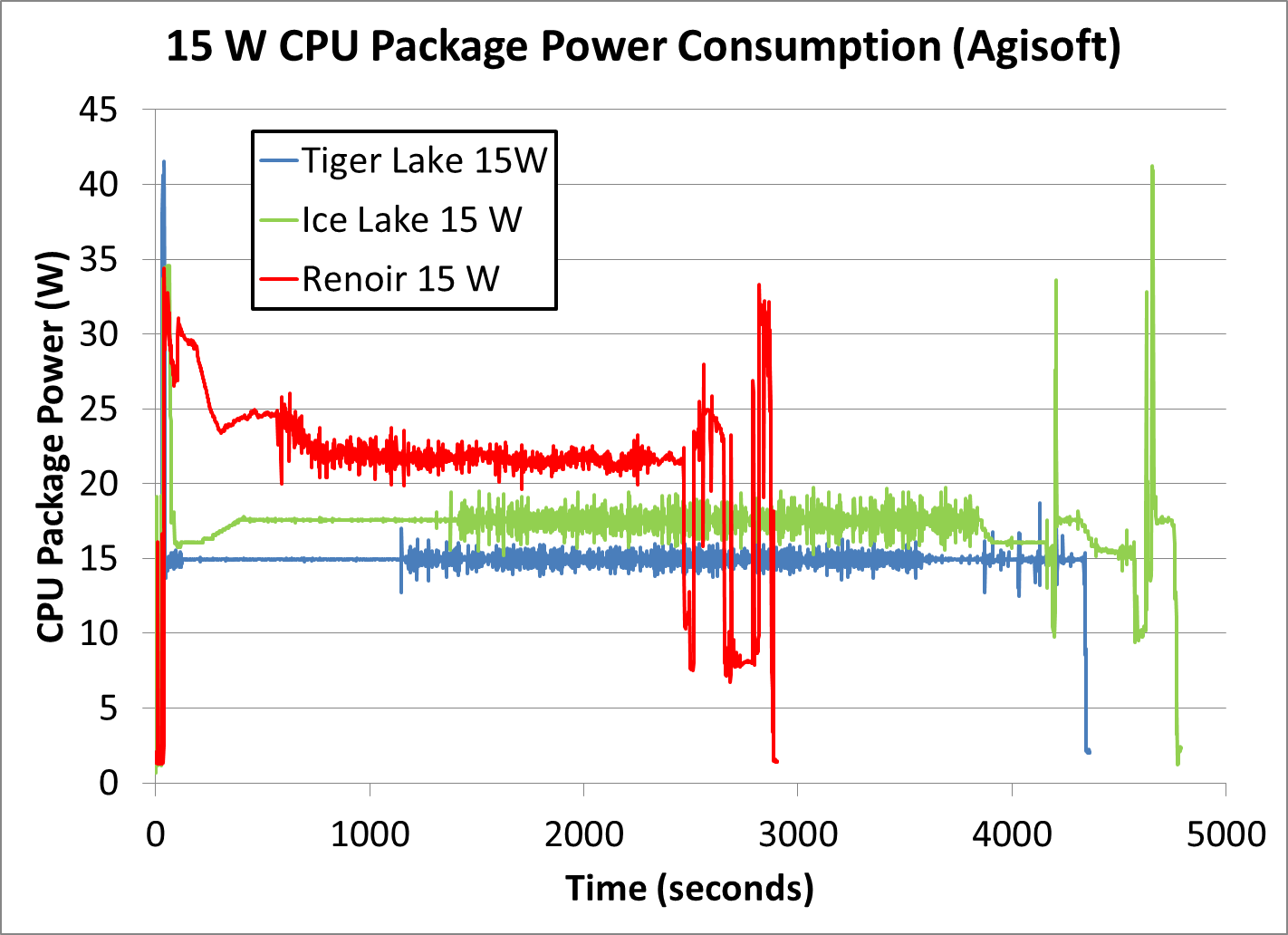
It's really really noxious in laptops where AMD allows processors to boost to 50% (more than the desktop chips even!) above their configured TDP for an unlimited period of time. Yeah partners get to pick the cTDP for the particular laptop, but either way an AMD chip with a 15W cTDP gets to use 50% more power than an Intel with a 15W cTDP, for an unlimited duration, which is a huge functional advantage... basically a 15W AMD laptop is more comparable to a 25W Intel laptop in terms of power draw, and a 25W AMD will pull more power than a 35W Intel. So they move themselves up a whole power bracket through The Magic Of Technical Marketing (tm).
It sounds high, but we’ve had plenty of AMD and Intel workstation CPUs with even higher TDPs for a long time. Overclockers have also routinely pushed well past that number.
235W is well within the range of what a decent air cooler like the Noctua NH-D15 can handle without excessive fan noise.
Justifying the off-the-shelves TDP of new GPUs/CPUs by saying it's still lower than what overclockers reach is the same as saying a car doing 50L/100KM is completely fine because an M1 Abraham uses 2000L/100KM offroad.
That's not what I said. I specifically said that AMD and Intel have been shipping CPUs with higher TDPs (stock!) for a long time. Overclockers have been going even further.
AMD's Threadripper PRO CPUs come with up to 280W TDPs.
It's really not a problem with modern air coolers and not a problem at all for people running liquid coolers.
A 253W boost TDP isn't really a big deal any more. There are plenty of smaller CPUs for people who don't want such high overheads.
There's a lot of "sky is falling" over these numbers, but it's a non-issue for the enthusiast builds these are targeted at. Nobody is forced to put a 253W CPU into their machine, but it's great that the vendors are making them available for those who want them.
Your comparison is moot as nobody is forcing you to buy the most gas guzzling chips Intel and AMD make as those are exclusively for enthusiasts who want to have the best of the best with no regard for value for money or efficiency.
But Intel and AMD also make enough chips with very good efficiency for the average folk who don't need to set benchmark records.
Here are the hourly prices in Denmark, without taxes and other charges which are about 1.6DKK/kWh. If you go forwards and backwards, you can see the price has varied/will vary from about 1kr to 4.5kr, plus tax, or 35¢ to 81¢. Car chargers can be set to charge at the cheap times, and things like dishwashers and washing machines have delay timers for people who want to run them at the cheaper times.
Straightforward day/night electricity rates have existed for decades, hourly rates are more recent, and optional.
100¢/kWh has happened in the last month, but only at a peak period. I'm not sure how long or how often it happened.
Wow... my whole desktop setup, with 3 screens, a 7-year-old intel CPU, a gaming GPU, and a grip of hard drives is showing a draw of 143W right now, up to 289W under stress (prime95). 235W just for the CPU is nuts.
As much as I want to agree on Ryzen, Intel is still the best platform for low-latency audio stuff. So I hope that performance-per-watt is or will be good as I'm beginning to get that PC-building itch. I'm curious what its idle usage is like.
But my living-room PC has a third-gen Ryzen (I built it just before the pandemic hit) and have been super pleased with its performance.
Just to clarify for the audience, there is nothing you can do within reason that will cause your CPU to ever self-heat above 100°. They manage their own power to stay below their maximum design junction temperature, less a safety margin. Even if you ran it without a heat sink, it will not run above 100°. It just won't run very well or very often.
I damaged some traces on an AMD board which allowed the CPU to talk to the VRM (anything related to SVI2 couldn’t be read when booted) and even that didn’t kill anything, it just put the system in like a 0.8 V, 400 MHz mode. Windows 10 takes an incredible amount of time to do literally anything on a system like that btw., even with twelve cores. Patched the traces and everything was back to normal.
Modern hardware is really difficult to permanently damage as long as you don’t go full “manual OC” - in that case many protections may be disabled, and you can certainly get Ryzens to overheat and die like that.
These designs pretty much demand a setup with a water cooling loop implemented via radiator sized for two 140mm fans (280 mm length).
Thankfully all-in-one kits for that which are pre filled and sealed are much more commonplace than they used to be, and even fairly cheap midtower ATX cases I see on newegg in the $60-70 range will have a top panel mounting place for a 280mm radiator.
And definitely any "gaming" marketed ATX case above that price range will have the capability for it.
You possibly could get away with a 240mm length radiator (dual 120mm fans) on something like this but I really wouldn't recommend it, and the savings for an AIO kit would be only $50-60.
From the perspective of noise annoyance, fan pitch and sound is somewhat proportional to size. 140mm fans can be a lot quieter and move more air than 120mm with less perceptible noise to the human sitting next to it.
Higher end stuff will be implemented by 360mm length radiator (3 x 140mm) which I am pleasantly surprised to see not ridiculously priced ATX cases having options mounting now.
I would figure you have to budget an additional $150-200 on top of the CPU cost for a capable water cooling loop setup. Which is not absolutely ridiculous considering that a really good skived copper heatsink/heatpipe/fan setup for pure air cooling on a 130W TDP CPU could easily be $65.
I can only speak for when I was a hiring manager and we called them bands, but it was essentially the same thing. We attached a band to every job posting and we would occasionally interview promising candidates and offer them the top end of a lower band or we'd offer them a more junior position with a promise of an early promotion review. Some took it, some didn't.
We've a system at my employer that has a 5" floppy, IDE CDRW drive (yes they exist) with USB 1 so that we can pull off some really ancient software every couple years.
I use CentOS, it updates about a month after redhat doses for the OS and a bit more frequently for most packages in my experience. It's also what >80% of my company uses for there server infrastructure.


reply